
 It may seem odd that I have selected an app that isn’t about learning the fundamentals like note recognition, timing or pitch. There is no keyboard and there are no note names.
But music education apps don’t need to be always obviously teaching. This app has been around for a few years now and I love it for its more subtle advantages:
- Encourages eye-hand co-ordination;
- Develops fine motor skills;
- Exposes students to a range of music they may not otherwise hear; and
- Helps students to develop a good sense of rhythm.
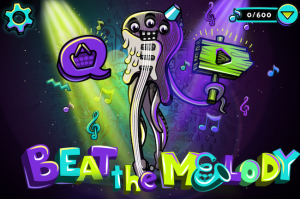
 The basic premise is that balls of light – representing the notes of a song – drop down the screen towards a line. You need to tap these balls as they reach the line. Doing so in the correct combination and sequence will play the song correctly. The balls are spaced variably and need to be tapped in the correct location, so you aren’t passively staying in one place.
The app is free and you are started off with a handful of free songs. Additional songs can be purchased for “smoola” (the in-game currency), which can be purchased or earned. Also, most days a free song is offered. You can earn smoola by watching advertising videos. I have never paid real money for smoola and have still accumulated over 165 songs, so it is easy enough to keep the game free and have enough content to keep you occupied.
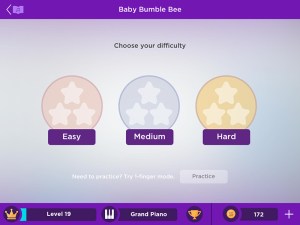 Three different levels of difficulty are available for every song – easy, medium and hard. The easy level contains single notes and two-note chords. The medium level includes three-note chords while the hard level moves up to four-note chords. There is also a range of difficulty in the songs themselves. For example, many of the old traditional pieces are written basically and are therefore simple, while a classical piece is much more involved. This means it is still incredibly useful (and fun) for total beginners but challenging for experienced musicians.
You can try playing with one hand or two. Being used to coordinating my hands from years of playing, I prefer to use two hands in faster passages when swapping quickly between chords and single notes.
Some songs link in with Smule’s other apps (singing and guitar) so you can play along to somebody else singing the song. You can even share your performance on social media.
Having a large range of music styles available means kids – and even adults – are exposed to styles of music they might otherwise never hear. This is a great asset for overall musicality and always a benefit for a music student. There are lots of current chart-toppers as well as favourites, such as songs from Frozen. The styles included are:
| Pop | Rock | Country |
| Classical | J-pop & K-pop | Kids’ songs |
| Traditional | Video games | Movies & TV |
| Musicals |
A little added extra (that I don’t use, so usually forget about) is a virtual keyboard that can be used to play tunes. It comes in a few different configurations. The tone is good, but the keys are very narrow.
Like any app, it’s not perfect and there are two aspects that are not ideal. Sometimes the balls drop too quickly after periods of rest or longer notes, so keeping to the rhythm you know is correct in your mind will result in you seeing a “play faster” message. This only happens occasionally on slower songs. A young friend once showed me that she could still get a perfect score by very quickly tapping on every ball, even though she wasn’t playing the notes of a chord together or following the correct rhythm. It was disappointing that doing this could result in a perfect score. But if you want to use it properly, it is a great tool.
Remember that not everything educational needs to be shouting it from the rooftop. Sometimes the more subtle approach can have just as much benefit. But be warned… this one is a little addictive!
If you are considering music lessons for your child or for yourself, please contact me to discuss the options. Piano lessons are conducted at my studio in Wallsend, NSW.

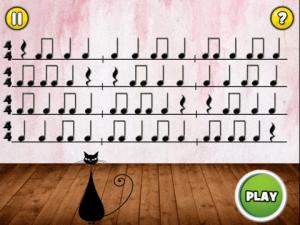 Rhythm Cat teaches and reinforces the most commonly-used musical rhythm notation. The free ‘Lite’ version has 15 levels while the ‘Pro’ version works up to following three different colours in each rhythm, encouraging co-ordination of both hands.
 The ‘Cat’ family also includes ‘Treble Cat’ and ‘Bass Cat’. I don’t tend to use Bass Cat with my beginners because it starts in a different octave, but Treble Cat is better suited. These games involve recognising the notes from amongst a group of notes, not just on their own. The notes also move slowly, giving you plenty of time to recognise the correct notes.
 A basic note recognition app, NoteWorks is customisable for difficulty, including clef/s and range of notes. The interface and sound effects are fun for younger students, but the app still moves quickly enough to be challenging for older students and adults.


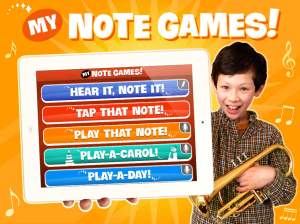 Tap that Note uses the device to identify notes, while Play that Note requires you to play to specified note on the piano (or whatever instrument you tell the app you are using). Play-a-day is a great sight reading exercise for intermediate students. As the name suggests, Hear It, Note It – also available as a standalone game – involves listening to what is played and notating it and has three difficulty levels within. Activities include tasks such as adding accidentals to correct a scale or completing rhythms with notes, rests and bar lines.
 While it does contain basic note recognition, Tenuto is really suited to more advanced students, as the majority of activities are more complex.
 merri bell music